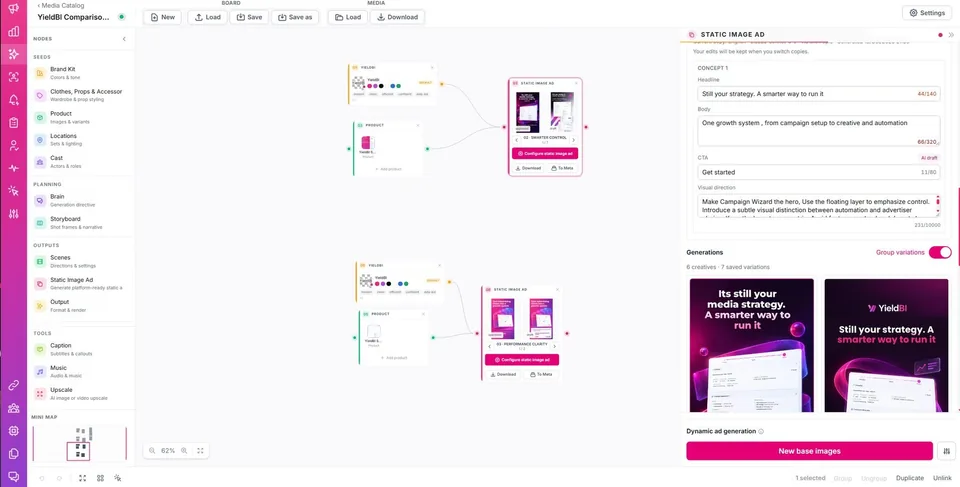
Build your cast, products, wardrobe, locations, and brand kit on one canvas, then wire them into the ads you want. Every shot in a run is generated against the same pinned reference images rather than a written description of them, so the product and the people stay the same from the first frame to the last. Paste your homepage and the brand kit builds itself.
01Media Studio canvas
Node canvas for cast, products, wardrobe, locations, brand kits, and storyboards
Continuity pinned once per run, so characters and products do not drift between shots
Brand kit extracted from your website: logo, colour palette, tone of voice, banned words
Image and video generation across multiple models, selected per node
Creative pattern analysis across hooks, formats, and placements to surface what's winning
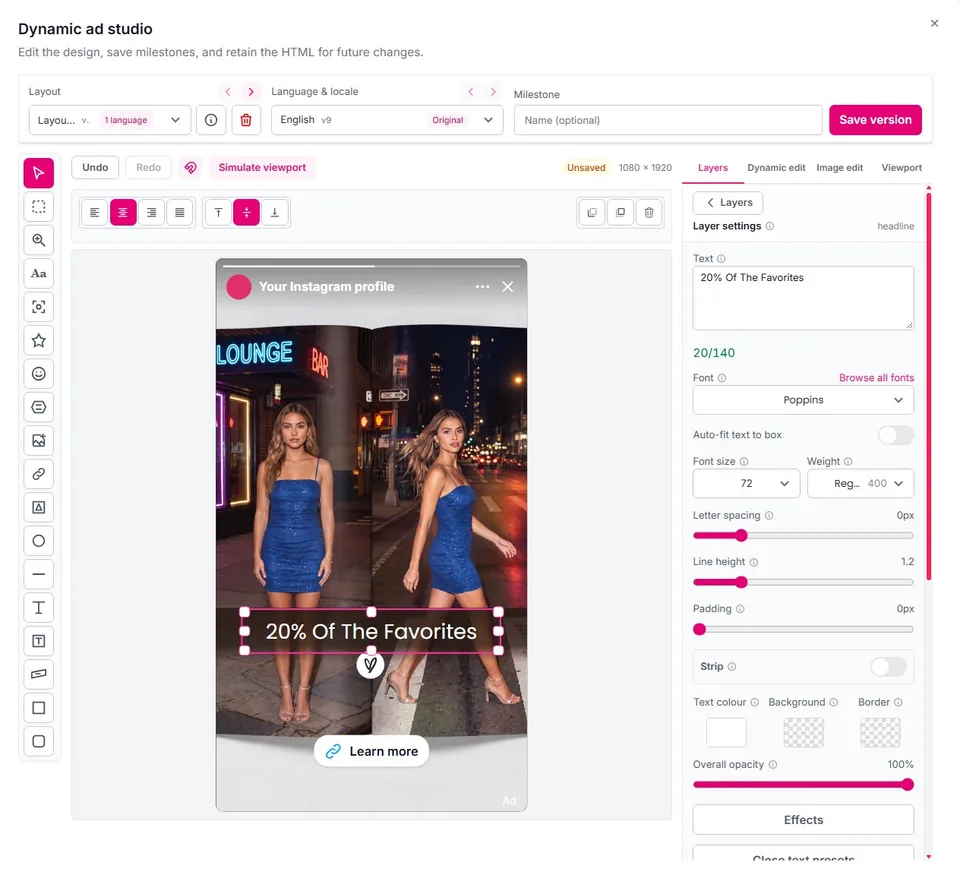
01 Create · Dynamic Ad Studio
Start from a finished design. Make it yours.
Generate your image and ad layout, then edit the headline, logo, colors, and CTA as separate layers, without starting over.
Move, resize, and style individual elements while keeping your base image
Revise the design, try a new composition, or develop new copy
Create language versions and save named milestones
Simulate the ad in each Meta placement, with safe zones and shading
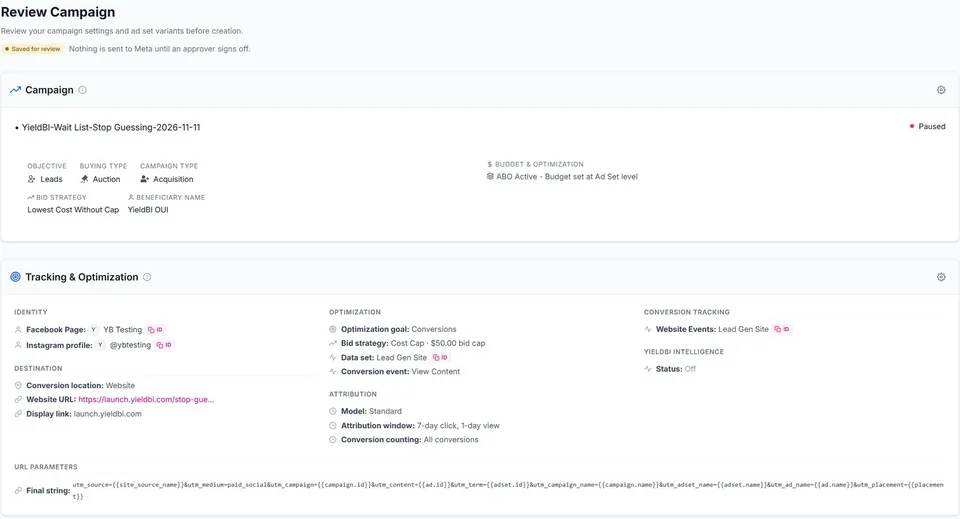
A promotion type for every goal, each with its own recommended objectives, fields, and validation rules. Build ad-set and creative variant combinations systematically, set your budget schedule, and review every field before you publish.
eCommerce
Lead gen
App installs
Brand
Local
Engagement
B2B
Events
Structured variant generation across audiences, placements, and bidding strategies for systematic testing
Budget scheduling with built-in validation, plus a dedicated review step before publish
03Campaign Wizard · Review
02 Launch · Ad Sets & Targeting
Every ad set, set up the way Meta reads it.
Set Advantage+ audience controls, geographic targeting, and an independent budget and schedule for each ad set, in a workspace built around how Meta structures campaigns today, not a simplified copy of it.
Advantage+ audience controls with visibility into what's actually driving expansion
Geographic and regional targeting, including transparency requirements by market
Independent budget and schedule per ad set
→Campaign
One goal, one naming template
01Ad set
AudienceBudget · schedule
02Ad set
AudienceBudget · schedule
03Ad set
AudienceBudget · schedule
Diagram of the structure, not a product screen.
02 Launch · Audiences
Build and reuse audiences across every account.
Create custom and rule-based audiences once, label them for your team, and apply them across campaigns and ad sets, including the regional advertiser transparency identities that some markets require.
01Build once
Custom and rule-based audiences, editable in place.
02Label
Team-facing audience labels for fast identification across accounts.
03Stay compliant
Regional advertiser transparency identity management for compliant markets.
04 Decide · Growth Controls & Optimization
Turn signals into a daily action list.
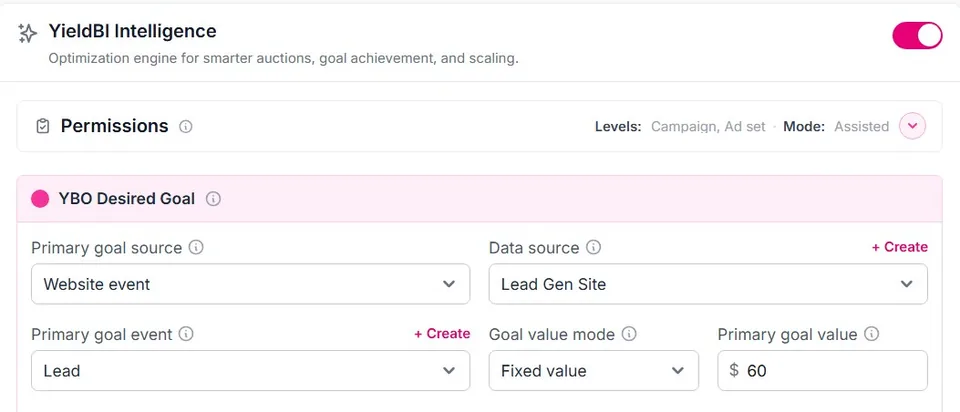
Set your Profit Goal and Growth Priority once, and YieldBI reads engagement, conversion, and revenue signals at the ad level to recommend what to scale, test, optimize, or pause next, every day, not just at the end of the month.
Growth ControlsProfit Goal and Growth Priority set the direction for every recommendation.
Signal-based optimizationEngagement, conversion, and revenue, read at the ad level.
Daily actionsRecommendations every day, plus optional rule-based automation where you want it.
03 Measure · Tracking & Attribution
Know which model actually drove the result.
Connect pixels and events, configure SKAdNetwork attribution for iOS app campaigns, and apply incremental attribution models with defined effective windows, so your numbers reflect how the campaign was actually measured, not a generic default.
Pixel and conversion event management in one place, with SKAdNetwork for iOS app campaigns
Incremental attribution models with configurable effective windows
Ad-level revenue visibility and audience discovery insights, not just aggregate account totals
07Campaign Wizard · Tracking
03 Measure · HeartBeat
The half of the funnel that happens after the click.
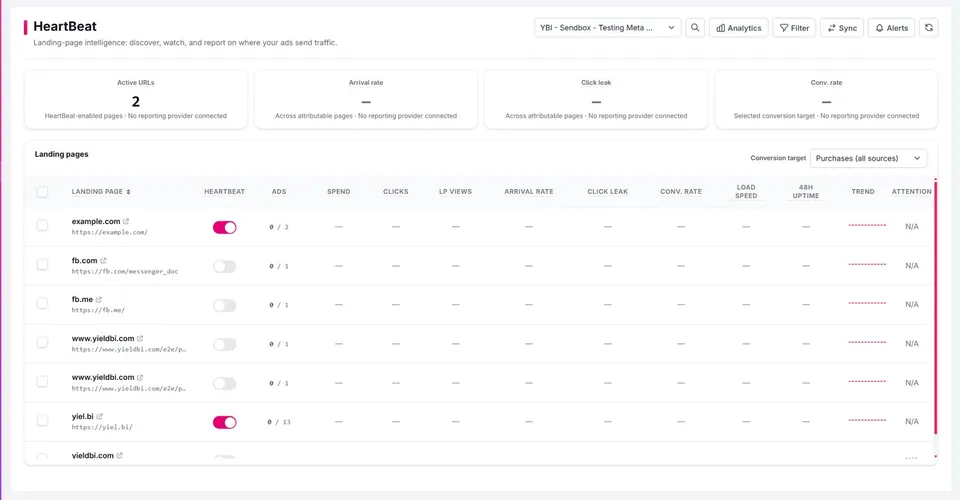
HeartBeat finds the landing pages your Meta campaigns send traffic to and groups them by URL. For each page you get spend, ad clicks, landing page visits, visit rate, and conversion rate, alongside every ad pointing at it.
The number most accounts never look at
The gap between clicks paid for and visits actually recorded. It is usually where the money goes.
Clicks paid forVisits recordedthe gap
08HeartBeat · Landing pages
Automatic landing page discovery from your live Meta campaigns
Spend, clicks, visits, visit rate, and conversion rate for every page
The click-to-visit gap, so traffic lost before the page loads becomes visible
Every ad pointing at a page, active and inactive, in one list
For teams · Governance & Approvals
Every change, accountable to someone.
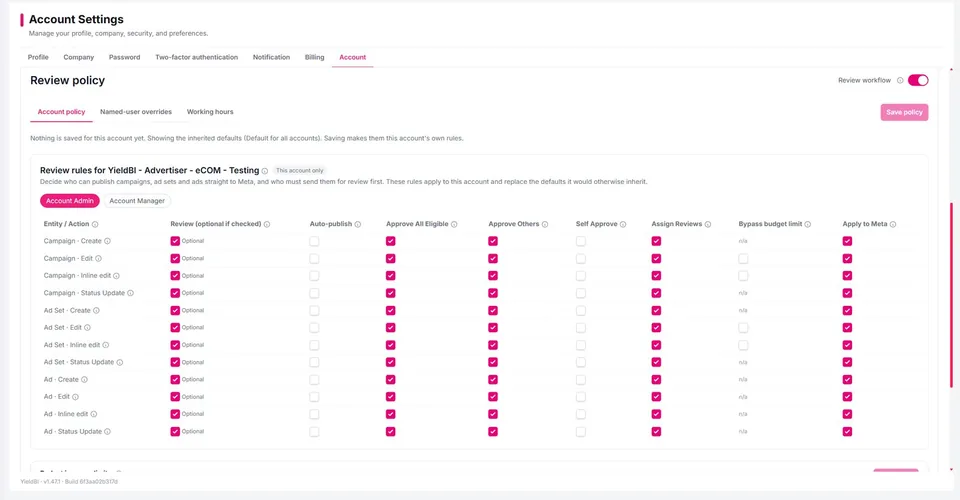
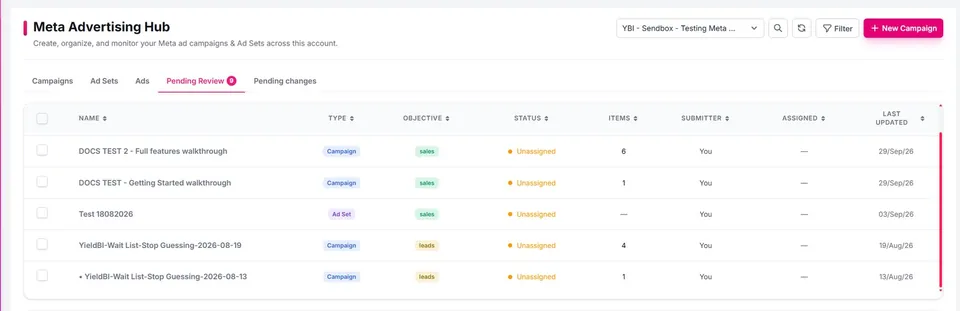
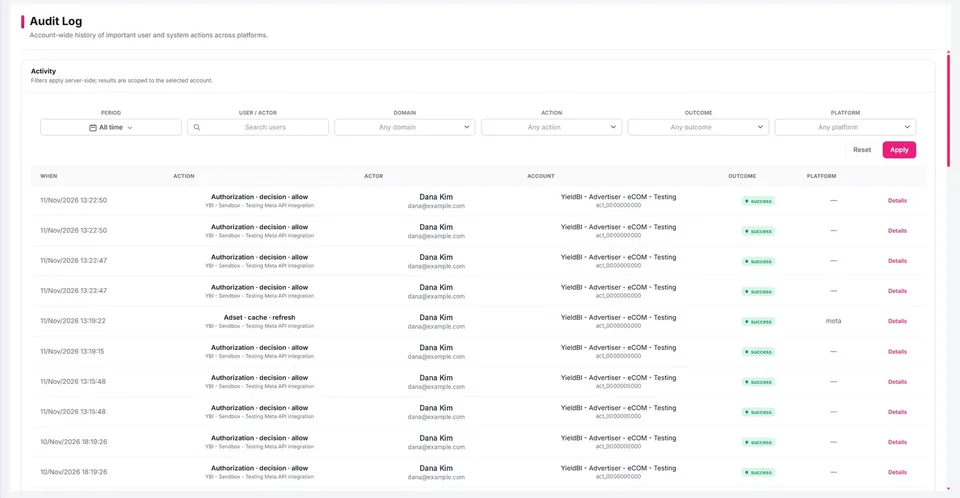
Changes to campaigns, ad sets, and ads can require approval before they publish. High budgets, special ad categories, and regionally regulated categories are routed for review automatically. The person who submitted or edited a change cannot be the one who approves it, and every decision is recorded with who, what, and when.
01Review policy
Automatic review for high budgets, special ad categories, and regulated markets
02Pending approval
Separation of duties: nobody approves their own submission. Field-level comments can block approval until resolved.
03Audit log
A searchable audit log of every submission, approval, rejection, and permission change
For teams · Multi-Account Management
Run every ad account from one console.
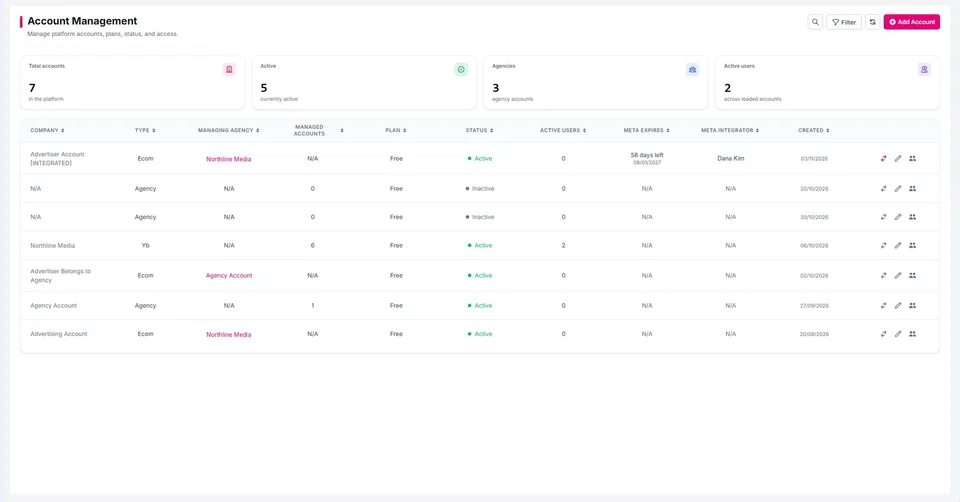
Manage Meta Business accounts, ad accounts, and advertiser transparency settings for your whole portfolio from a single admin surface, built for teams and agencies running spend across many clients, not a single-account tool stretched to fit.
Centralized Meta Business and ad account management
Account-level configuration and defaults for consistent setup
Built for agencies and teams managing multiple client accounts
10Accounts
Get started
Find what works. Scale what wins.
Bring your creatives, campaigns, tracking, and optimization together in one place.
Yes. YieldBI is an independent growth platform that works with Meta Ads. It combines creative generation, campaign management, conversion tracking, and optimization into a single system designed to help advertisers find what works and scale what wins. YieldBI is not affiliated with Meta.
Does YieldBI replace Meta Ads Manager?
That's the goal. YieldBI is designed to become the primary workspace for Meta advertisers. Instead of switching between multiple tools and dashboards, advertisers can create campaigns, analyze performance, and make optimization decisions from one system. Meta provides the inventory. YieldBI provides the operating system.
Does YieldBI generate UGC ads?
Yes. YieldBI generates image, video, and UGC-style ad variations, helping advertisers test more ideas and discover winning creatives faster.
How does YieldBI identify winning ads?
YieldBI analyzes engagement, conversion, audience, and revenue signals at the ad level to understand what's driving performance and uncover opportunities for growth. By connecting these signals across campaigns and creative variations, YieldBI helps advertisers identify winners sooner and scale them faster.
Why do advertisers switch to YieldBI?
Because most advertisers don't need more dashboards. They need fewer tools. YieldBI combines the four growth layers every advertiser depends on: Creative Generation, Campaign Management, Conversion Tracking, and Performance Optimization, everything working together in one place.
Product illustrations use example names and values.
We use cookies to improve your experience.
Analytics and marketing cookies load only with your consent. See our Privacy Policy for details. Privacy Policy